Ever found yourself on a plane, train, or stuck somewhere with spotty Wi-Fi—and suddenly, you can’t access your emails? It’s frustrating, right? Losing access to your inbox can really throw a wrench in your productivity.
Luckily, Gmail has a solution: Offline Mode. In this guide, I’ll show you how to set it up and make the most of it, so you can manage your emails anytime, anywhere—even without an internet connection.
What Is Gmail Offline Mode?
Gmail Offline is a handy feature that lets you read, reply to, search, and even compose emails when you’re not connected to the internet. How does it work? It stores (or caches) a copy of your emails on your device.
The best part? Once you’re back online, Gmail automatically syncs everything you did offline—like sending emails or organizing your inbox—so you’re always up to date. It’s a lifesaver for staying productive, whether you’re traveling, commuting, or dealing with unreliable Wi-Fi.
🚀 How to Use Gmail Offline
Getting started with Gmail Offline is super easy. Here’s how:
- Open Gmail:
Log into your Gmail account using Google Chrome (since Offline Mode works with it). - Go to Settings:
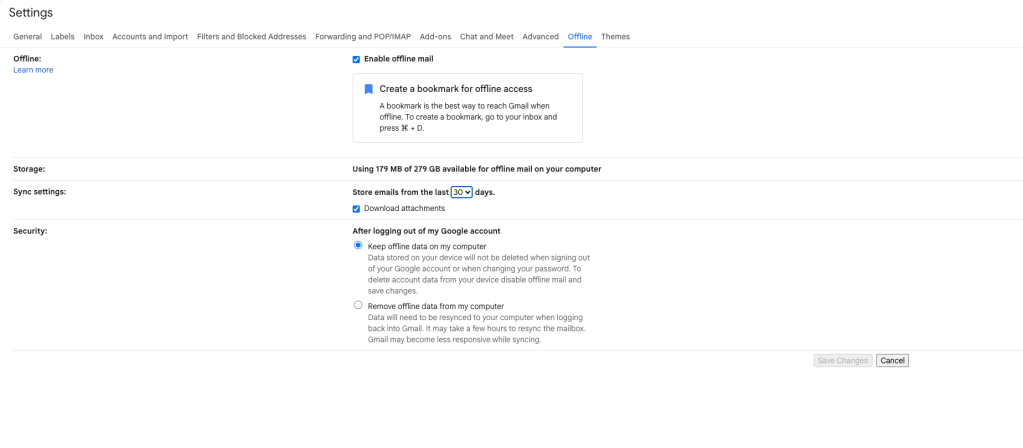
Click the gear icon in the top-right corner of your inbox, then select “See all settings.” - Find the “Offline” Tab:
Scroll through the settings tabs until you find “Offline.” Click it. - Enable Offline Mode:
Check the box that says “Enable offline mail.” - Adjust Your Settings:
Choose how many days (7,30,90) of emails you’d like to sync and whether to keep offline data on your device. - Save Changes:
Click “Save Changes”—and that’s it! Gmail will start syncing your emails for offline access.
Note: Gmail Offline works only in your web browser, specifically Google Chrome. It doesn’t work in mobile apps or other browsers.
💡 Pro Tips for Using Gmail Offline
- Set It Up in Advance:
Don’t wait until you’re without Wi-Fi. Enable Offline Mode ahead of time to avoid any last-minute surprises. - Keep Your Browser Updated:
Make sure Google Chrome is up-to-date to get the best performance and security. - Draft Now, Send Later:
You can compose emails offline. Gmail will automatically send them once you’re back online. - Sync Regularly:
After reconnecting, give Gmail a moment to sync all your offline actions—it only takes a few seconds.
🌍 Real-Life Scenarios Where Gmail Offline Shines
✈️ Air Travel:
Catch up on emails during long flights, even in airplane mode.
🚆 Commuting:
Reply to important messages on the train or bus without worrying about Wi-Fi.
🏕️ Remote Work:
Stay connected when working from areas with unreliable internet—perfect for digital nomads!
🎤 Before Presentations:
Prepare emails in advance, even if you know you’ll be offline during the event.
Gmail Offline is a game-changer for staying productive no matter where you are. It’s easy to set up, simple to use, and can save you from a lot of stress when internet access is out of reach.
Give it a try—you’ll love the freedom of managing your inbox anytime, anywhere. Have tips or experiences with Gmail Offline? Share them in the comments below!


Leave a Reply