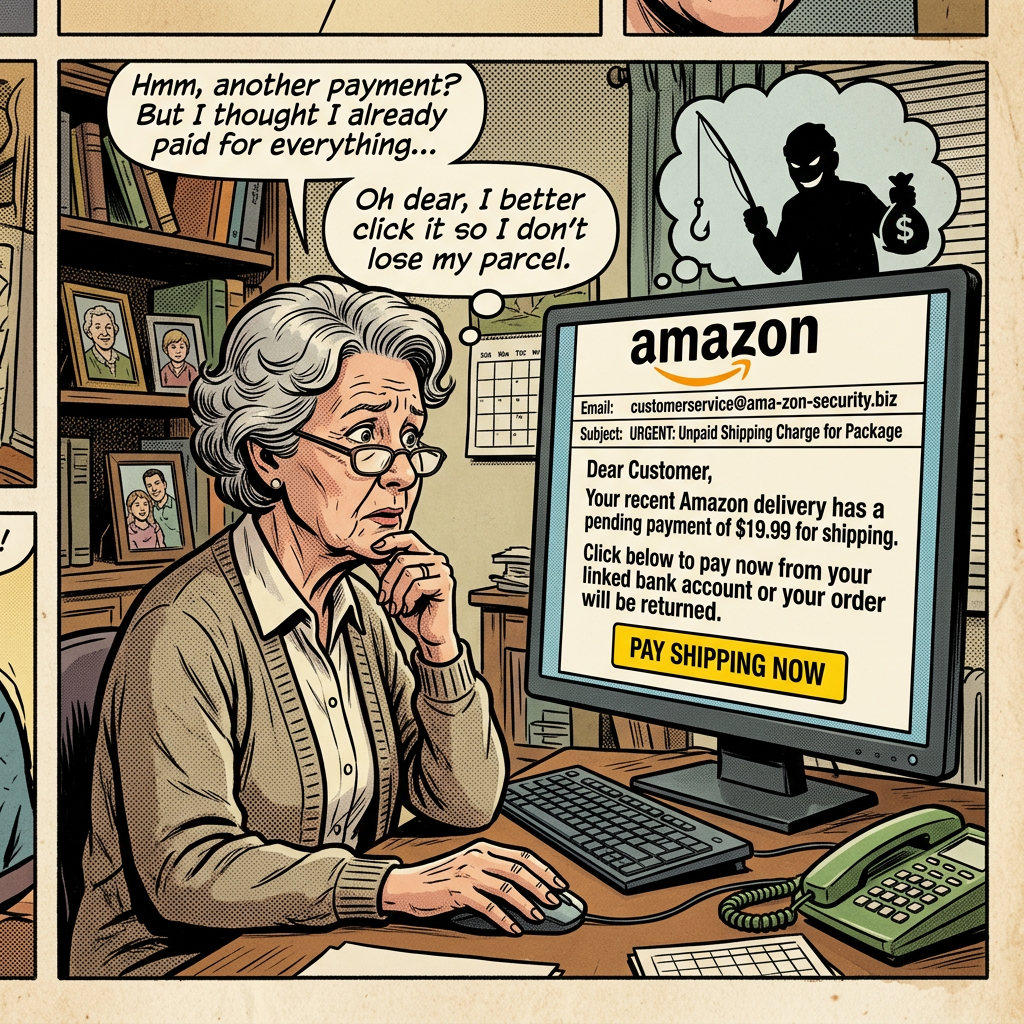
Have you ever opened your phone during a busy afternoon only to see a startling notification: “USPS: Your package delivery has been suspended! Tap here to update your address within 24 hours, or your parcel will be returned”?
Your heart skips a beat. You are expecting a package, after all. Or maybe you’ve received an alarming email from “Your Bank” claiming an unauthorized $450 charge on your account, complete with an urgent, bright red “Dispute Transaction Now” button.
In that split second of panic, it is painfully easy to tap the link, type in your password or card number, and breathe a sigh of relief—only to realize hours later that you’ve walked right into a digital trap. Scams like this happen to millions of smart, careful people every day. Digital deception isn’t about how tech-savvy you are; it’s about how clever tricksters manipulate everyday human curiosity and fear.
The great news? Once you know the simple visual cues that scammers rely on, you can spot these deceptive traps from a mile away and browse with complete peace of mind.
1. What exactly is phishing?
To understand it, imagine a complete stranger knocking on your front door wearing an oversized, brightly colored delivery vest. They hold a clipboard and point toward a beat-up unmarked van parked across the street. Instead of handing you a parcel, they look you straight in the eye and say: “Before I hand over this package, you must give me your front door keys and tell me your bank PIN so I can confirm your address.”
You would immediately say no, close the door, and lock it. Why? Because simply wearing a printed vest doesn’t make someone a legitimate courier, and no real delivery company asks for your house keys to drop off an envelope.
Phishing is the digital version of that fake courier.
A scammer slaps a familiar company logo—like PayPal, Netflix, Amazon, or your local post office—onto an email or text message. They create artificial urgency, hoping you will hand over your digital house keys (your passwords, personal details, or credit card numbers) before your common sense has time to catch up.
Why You’ll Love Having a Scam-Detection Routine
- Save hours of manual effort recovering locked profiles or filing complex fraud claims
- Avoid silly mistakes born from sudden, stressful notification panic
- Keep your day organized by immediately sweeping junk out of your inbox
- Browse with confidence knowing you control your own digital front door
2. Who Is This For?
Protecting your inbox isn’t just for IT professionals in corporate offices. It’s a fundamental life skill for everyday digital life:
- Busy Professionals sorting through dozens of work emails, vendor invoices, and meeting invites between back-to-back calls.
- Home Organizers & Shoppers tracking multiple home deliveries, groceries, and seasonal gifts across different stores.
- Students managing financial aid notifications, course registrations, and campus portal login prompts.
- Small Business Owners handling client invoices, bank transfers, and confidential vendor communication.
- Family Members & Seniors seeking an easy, stress-free way to stay connected online without worrying about digital fraud.
3. Simple Step-by-Step Guide: The 5-Second Inbox Check
You don’t need fancy security software or technical knowledge to verify whether a message is real. Whenever an email or text demands your attention, walk through these easy steps:
Step 1: Inspect the Real Address Behind the Display Name
Scammers can label their display name as anything they want—even “Bank of America Customer Support.”
- On your computer or smartphone, click or tap the sender’s name at the very top of the email to reveal the full address line.
- Look closely at the part right after the
@symbol. If an email claiming to be from Netflix arrives fromsupport@account-update-notice382.cominstead of@netflix.com, it’s an imposter. Toss it straight in the trash.
Step 2: Hover Before You Click
If an email asks you to click a button like “Update Account” or “Track Package”:
- On a computer: Rest your mouse cursor over the link or button without clicking it. Look down at the bottom-left corner of your browser window. A small preview will show you the exact web address the link actually leads to.
- On a phone or tablet: Gently touch and hold the link (long-press) for two seconds. A preview window will appear showing you the real destination website before you visit it.
Step 3: Spot the Panic Button (Artificial Urgency)
Real companies give you reasonable time to handle billing updates. Scammers, on the other hand, want you to act before you think. Beware of phrases designed to trigger adrenaline:
- “Your account will be terminated in 2 hours!”
- “Immediate action required: Suspicious login detected!”
- “Unclaimed lottery winnings expire at midnight!”
Whenever a message shouts at you to hurry, slow down on purpose.
Step 4: Use the “Side Door” Method
Never click a link inside a suspicious email or text to log into your account. Instead:
- Close the message entirely.
- Open your web browser.
- Manually type the company’s official address into your address bar (or open their verified smartphone app).
- Log in normally and check your account notifications. If there is a real issue with your billing or order, it will always be waiting inside your official account dashboard.
💡 Everyday Shortcut Tip: Want to quickly check where you are on the web? Press Ctrl + L (on Windows) or Cmd + L (on Mac) to immediately highlight your browser’s address bar so you can clearly read the true website domain.
Step 5: Report and Mark as Junk
Instead of just hitting “Delete,” help your email service learn:
- Click the three dots (More Options) at the top of the message in Gmail, Outlook, or Apple Mail.
- Select “Report Phishing” or “Mark as Spam.” This helps your email provider automatically shield other people from the exact same trick.
4. Emergency Action: What If You Already Clicked?
If you realize you just tapped a suspicious link or entered information onto an unfamiliar page, don’t beat yourself up. Take these three quick actions immediately:
- 🔒 Change Your Password Right Away: Go directly to the official website and update your password. If you use the same password elsewhere, be sure to update those accounts too. Using a dedicated password manager guide makes generating and updating unique passwords effortless.
- 🛡️ Enable Two-Step Verification: Turn on two-factor authentication on your account so that even if a scammer has your password, they cannot log in without your separate security prompt.
- 💳 Call Your Bank or Card Provider: If you entered credit card or debit card details, call the official number on the back of your physical card immediately. Ask them to freeze the card and monitor for unauthorized charges.
5. Everyday Life Hacks & Tips
- The Familiar Phone Call Rule: If an email claims a family member needs emergency money, or your boss asks for quick gift cards, contact that person using a phone number you already have saved in your contacts. Never dial a phone number printed inside the suspicious message.
- Beware of Generic Greetings: Companies you do business with know who you are. An email addressed to “Dear Valued Customer” or “Dear user@email.com” instead of your actual first name is a classic warning sign.
- Switch to Authenticator Apps: Whenever possible, use authenticator apps (like Google Authenticator or Apple Keychain) instead of standard text-message codes.
- Look for Awkward Typos and Odd Formatting: Many scam messages contain slight spelling missteps, mismatched fonts, or blurry company logos copied from image searches.
- Hit the Escape Key on Popups: If an alarming website popup suddenly takes over your screen shouting that your computer has a virus, do not click “Scan Now.” Simply press Esc on your keyboard or close the browser tab directly.
6. The 5 Core Benefits Breakdown
- ⚡ Time Saved: You never have to spend hours on hold with credit card fraud departments, disputing unauthorized payments, or frantically recovering lost accounts.
- 🧘 Peace of Mind: Instead of feeling a jolt of anxiety every time an urgent notification buzzes your phone, you feel calm, confident, and completely in control.
- 🔒 Privacy & Safety: Your sensitive documents, family photos, and financial details stay protected behind strong, untampered locks.
- 🤝 Easy Collaboration: By keeping your personal and work accounts secure, you prevent your inbox from accidentally sending harmful spam links to your friends, family, and colleagues.
- ✨ Total Simplicity: You don’t need to master cybersecurity jargon or install expensive software. A simple five-second visual check is all it takes to stay safe.
7. Real-World Scenario: Sarah and the Holiday Package Alert
It was three days before Christmas, and Sarah was in the middle of wrapping presents while her phone buzzed with notifications. Between tracking shipments for her family, cooking dinner, and answering work emails, she received a text message:
“USPS Express Alert: Your package delivery was attempted today at 2:15 PM, but could not be completed due to an incorrect house number. Please update your details and pay the $0.40 redelivery fee here: usps-redelivery-portal9.com/tracking”
Sarah’s immediate instinct was to tap the link. After all, she was waiting on a special gift for her sister that was supposed to arrive that exact afternoon.
But Sarah paused and remembered the “Side Door” rule.
Instead of tapping the text message link, she opened her laptop, visited the official USPS website directly, and pasted the tracking code from her original purchase confirmation email. The official tracking page showed her package was on the delivery truck and arriving on schedule with no extra fees required.
By taking ten seconds to check the official source instead of reacting to the panic-inducing text, Sarah avoided entering her credit card onto a fake clone site, saving herself hundreds of dollars and a ruined holiday.
Key Takeaways
- Urgency is a Trap: Scammers create artificial panic to short-circuit your critical thinking. When an alert demands instant action, take a deep breath and pause.
- Names Can Lie, Addresses Don’t: Always tap or click the sender’s display name to look at the actual domain after the
@symbol. - Hover Before Tapping: Use a quick mouse hover or a mobile long-press to reveal the true web address hidden beneath buttons.
- Always Use the Side Door: When in doubt, bypass the link in the message entirely. Open a new window and navigate straight to the official app or website on your own terms.
Conclusion & Friendly Call-to-Action
Staying safe online doesn’t mean living in constant fear of opening your email. Just like looking both ways before crossing the street, spotting phishing scams is a simple, healthy habit that quickly becomes second nature. Once you know what to look for, you can navigate your digital world with absolute ease.
Have you ever spotted a wildly clever (or hilariously obvious) fake email in your inbox? What was the giveaway clue that tipped you off? Let us know in the comments below! 🚀


Leave a comment