Feeling overwhelmed trying to keep up with emails, deadlines, and constant communication? You’re not alone. A cluttered inbox and poor scheduling can easily lead to missed opportunities. But what if you could take control of your inbox—strategically sending emails at just the right moment, without having to be online 24/7?
In this guide, you’ll discover how to schedule emails like a pro, helping you stay organized, save time, and boost your productivity effortlessly.
What Is Email Scheduling?
Simply put, email scheduling lets you write an email now and send it later—automatically. It’s like setting a reminder, but instead of pinging you, it sends your email exactly when you want.
Whether you’re most productive late at night or early in the morning, scheduling allows you to craft thoughtful emails when it suits you and deliver them when your recipient is most likely to see them. No more mental notes or calendar reminders to hit “send” at the perfect time—it’s all handled for you.
How to Schedule Emails
While the exact process can vary slightly depending on your email provider (like Gmail, Outlook, etc.), here’s the basic workflow:
- Write Your Email:
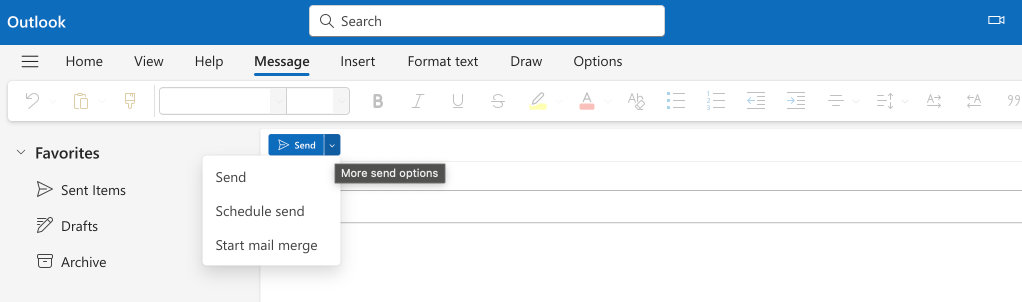
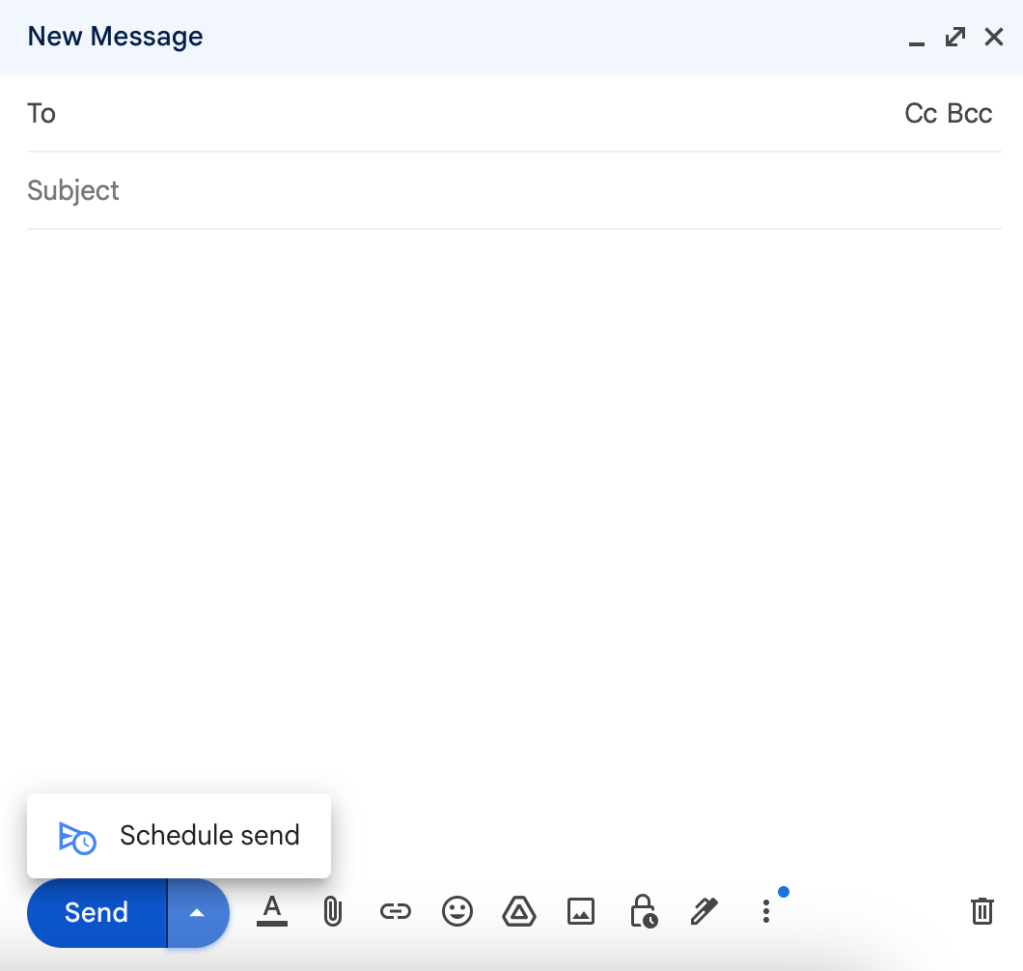
Draft your message as usual—make it clear, concise, and engaging. - Find the Scheduling Option:
Look near the “Send” button for options like “Schedule Send,” “Send Later,” or a small calendar icon.
- Pick Your Date & Time:
Choose when you’d like your email to go out. Most platforms offer a calendar and clock interface for easy selection. - Double-Check Everything:
Review the recipient’s address, subject line, and content to avoid last-minute mistakes. - Schedule It:
Hit “Schedule” or “Send Later”—and you’re done! Your email will be automatically sent at your chosen time.
Pro Tips for Smarter Email Scheduling
💡 Think About Time Zones:
If you’re emailing someone in a different region, schedule your message to land during their work hours.
💡 Batch Your Emails:
Group similar emails together and schedule them in one go to save time.
💡 Perfect for Important Announcements:
For big updates or critical messages, scheduling ensures they reach inboxes when people are most attentive.
💡 Experiment with Send Times:
Test different days and times to see when your emails get the best responses.
💡 Don’t Overdo It:
While scheduling is handy, avoid sending too many emails back-to-back—it can overwhelm your recipients.
Real-World Use Cases for Email Scheduling
📬 Newsletters:
Set your newsletters to go out when your audience is most likely to engage—think early mornings or lunch breaks.
📈 Lead Follow-Ups:
Keep prospects engaged by scheduling follow-up emails at just the right intervals.
⏰ Appointment Reminders:
Reduce no-shows by sending automated reminders ahead of meetings or events.
🚀 Marketing Campaigns:
Schedule promotional emails to align perfectly with product launches or sales events.
👥 Internal Team Updates:
Share important announcements with your team at times that don’t interrupt their flow.
Email scheduling isn’t just a cool feature—it’s a game-changer. It helps you stay organized, communicate more effectively, and free up mental space. Whether you’re managing work projects, keeping in touch with clients, or running marketing campaigns, scheduling emails can boost your productivity in ways you never imagined.
So, why not give it a try? Start scheduling your emails today and see the difference for yourself. Got any email scheduling hacks? Share them in the comments—I’d love to hear your tips!


Leave a Reply